Use your current game values. Numeric cases below are illustrative; exact game rates and prices have not been independently tested.
Treat the map as a changing state
A territory screenshot helps you recognize the interface; it does not tell you who owns a district now. Start by identifying your selected region, the target district and the ownership information shown in the live panel. Then check whether the action you intend is currently available to your account and family.
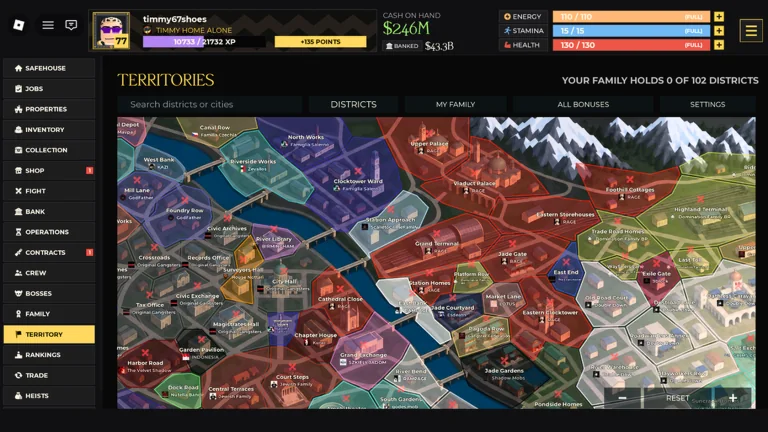
The official promotional screenshot shown here is an interface reference. It is not a live map, a capture formula or evidence of a permanent district count. It shows the game at the time that image was produced.
What the official screenshot actually shows
The image contains a Territories heading, a district search box and tabs labeled Districts, My Family, All Bonuses and My Stats. The map is divided into colored areas with named locations. The left navigation includes both Properties and Territory, so opening one is not the same interface action as opening the other.
Use those visible cues to orient yourself. Do not infer ownership rules from a color without checking the current legend or selected district. The image also shows a family-held counter; its denominator is a property of that captured interface state, not a verified total for every account or version.
Inspect one target in a consistent order
- Find the district using the name or search control shown in your build.
- Open its details and read the current owner and any status or timer.
- Read the action requirements and costs before confirming anything.
- Check the displayed benefit and who receives it.
- Confirm that your family wants this objective and can support the timing.
This is a reading checklist, not a claim that every target exposes the same fields. If the client does not state a reward or capture condition, do not fill the gap using a number from an unrelated screenshot.
Compare two districts without inventing a ranking
| Field to record | Why it changes the plan |
|---|---|
| Visible requirements | An unavailable action is not a candidate yet |
| Displayed cost | Sets the resources the family must commit |
| Current owner or status | May change between planning and action |
| Stated benefit and recipient | Separates personal income from group value |
| Participants available | Determines whether the plan is practical |
A district with a larger stated benefit can still be the worse objective if its requirements cannot be met at the agreed time. Keep unknown fields explicitly unknown. This prevents a visually impressive map location from becoming an unsupported recommendation.
Do territory benefits affect personal properties?
Only apply a territory effect to a property calculation when the current game says it applies or a controlled observation supports it. If the displayed property income already includes a bonus, adding it again double counts the benefit. If ownership may change, compare a scenario with the bonus and another without it.
Use the property comparison tool for those separate scenarios. For the group plan, move to family-war preparation and the dated time-zone converter. Recheck target state immediately before the session rather than relying on a shared screenshot from the previous day.
Sources & scope
Core systems are described by the developer. Strategy is editorial guidance unless a specific test is cited. Exact prices, unlocks and rewards should be checked in your current game.
Report a discrepancy